
Site plan scale is the ratio between a distance on the drawing and the same distance on the ground. It is what lets a plan reviewer measure your setbacks with a ruler instead of visiting your lot. Get it wrong, or leave it off, and the drawing cannot be checked, which is why a missing or incorrect scale is a classic reason for a correction notice.
Quick answer: Residential site plans normally use an engineer’s scale such as 1 inch = 10, 20 or 30 feet, picked so the whole lot fits on the sheet with room for labels. The scale must be written on the drawing, and a graphic scale bar should be included so the plan stays measurable if it is printed larger or smaller.
How site plan scale works
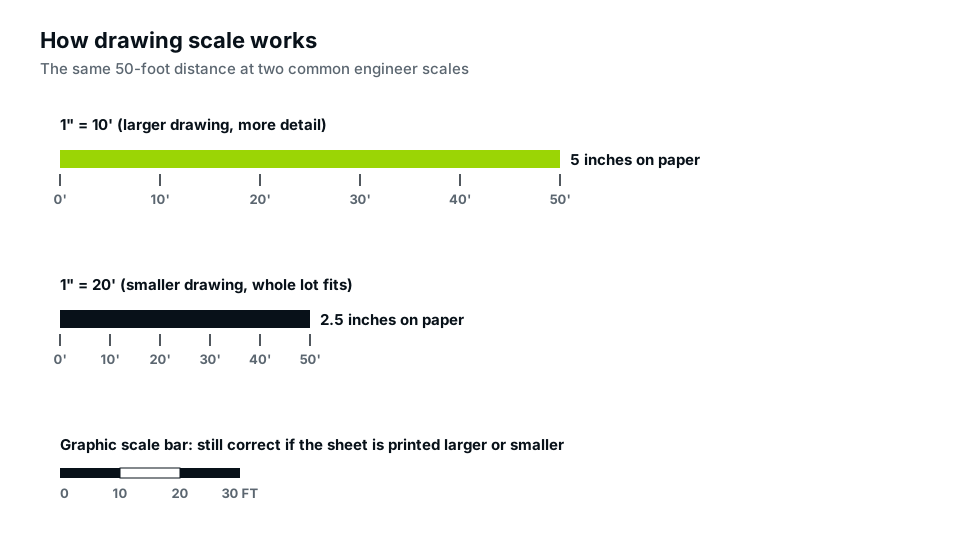
A scale of 1″ = 20′ means one inch on paper represents twenty feet on the ground. A 100-foot-wide lot therefore takes up five inches of paper. Double the scale to 1″ = 10′ and the same lot needs ten inches, but every detail is twice as large and easier to read.
Site plans use an engineer’s scale (inches to feet in multiples of ten). Floor plans and elevations use an architect’s scale instead, such as 1/4″ = 1′-0″. Mixing the two up is a surprisingly common error, a point covered in our main guide on what a site plan is.
Which site plan scale fits your lot?
Choose the largest scale that fits the whole lot on the sheet with a margin for dimensions and notes:
| Lot size (approx.) | On 11 × 17 in | On 24 × 36 in |
|---|---|---|
| Up to 60 × 120 ft | 1″ = 10′ or 20′ | 1″ = 10′ |
| Up to 100 × 200 ft | 1″ = 20′ | 1″ = 10′ or 20′ |
| Up to 1 acre | 1″ = 30′ or 40′ | 1″ = 20′ |
| Several acres | 1″ = 50′ to 100′ | 1″ = 30′ to 50′ |
Some permit offices set a minimum, for example “no smaller than 1 inch = 30 feet”. Check the checklist before choosing.
Why a graphic scale bar matters
Most plans are now submitted as PDFs and printed at whatever size the reviewer chooses. A drawing labelled 1″ = 20′ but printed on letter paper instead of 11 × 17 will no longer measure correctly. A graphic scale bar, a small striped ruler drawn on the sheet, shrinks and grows with the drawing, so it always measures true. Many reviewers now expect one, and it costs nothing to include.
Reading distances with the scale
- Measure the gap on paper with a ruler.
- Multiply by the scale (1.5 inches at 1″ = 20′ is 30 feet), or lay the ruler against the scale bar.
- Compare with the written dimension. If they disagree, the written dimension usually governs, but the mismatch should be fixed.
Our step-by-step guide on how to read a site plan shows where to find the scale and what to check next.
Setting the scale when you draw your own site plan
If your permit office accepts homeowner drawings, scale is the part to get exactly right:
- Measure the sheet. Subtract margins and room for the title block to find the usable drawing area.
- Divide the longest lot dimension by the usable length. A 150-foot lot on 14 usable inches needs at least 150 ÷ 14 ≈ 10.7 feet per inch, so 1″ = 20′ is the next standard scale.
- Draw with an engineer’s scale ruler or software set to that scale, never by eye.
- Write the scale and add a scale bar near the title block.
- Print a test copy at 100% and measure one known dimension, such as the lot frontage, to confirm.
Drawing software makes this easier, but the same rule applies: set the scale before you draw, not after.
“Not to scale” and other warning signs
- “NTS” (not to scale) on a site plan is a red flag. Reviewers can’t check setbacks from it.
- Two different scales on one drawing without a clear label for each.
- A screenshot of a map pasted into a document; its scale is unknown.
- Dimensions that disagree with the scale, which suggests something was edited after drawing.
Scale and accuracy are not the same thing
A drawing can be perfectly to scale and still be wrong if the source data was wrong. A plan traced from an approximate county parcel map will be drawn accurately to an approximate boundary. That is fine for most permits, but if your project is within a foot or two of a setback, the boundary itself may need a survey. Our guide on site plan vs plot plan explains what each drawing is expected to show, and our site plan service notes the data source on every sheet.
Frequently asked questions
What is the most common site plan scale?
For typical suburban lots, 1 inch = 20 feet is the most common, with 1 inch = 10 feet for small lots and 30 or 40 feet for larger ones.
Can a site plan be drawn at 1/4 inch = 1 foot?
That is an architectural scale for floor plans. A whole lot would not fit on a normal sheet at that scale, so site plans use engineer’s scales.
Do I need a scale bar if I already wrote the scale?
Include one. Written scales become wrong when a PDF is printed at a different size; a graphic scale bar stays correct.
What does “NTS” mean on a drawing?
Not to scale. It is acceptable on a detail or diagram, but not on a site plan that the reviewer needs to measure.
Can I print my site plan on a different paper size?
Yes, if it has a graphic scale bar and you tell the reviewer the printed scale changed. Without a scale bar, a plan printed smaller or larger than drawn can no longer be measured accurately, which is a common reason for comments on PDF submittals.