
Permit correction comments are the reviewer’s list of changes or information needed before your permit can be issued. They can look intimidating, but they are a to-do list. Handled methodically, most correction notices are resolved in one resubmittal. Handled loosely, they turn into a second and third round. This guide gives a workflow you can follow every time.
Quick answer: To respond to permit correction comments, number and sort every comment by the sheet it affects, revise the drawings, mark each change with a revision cloud and delta, and write a response letter that answers every comment by number and points to the sheet where it was fixed. Resubmit the complete revised set and the letter together.
Step 1: Read all the permit correction comments first
Read the whole notice before changing anything. Comments from different reviewers can overlap or affect each other: a zoning comment that moves a deck can change the structural details too. Note the response deadline, the resubmittal format, and whether all disciplines must respond together. For background on why comments happen at all, see our pillar guide on why building permits get rejected.
Step 2: Number and sort the comments
If the reviewer didn’t number the comments, number them yourself in their order. Then make a simple table:
| # | Reviewer | Comment summary | Sheet | Action |
|---|---|---|---|---|
| 1 | Zoning | Show rear setback | A0.1 site plan | Add dimension |
| 2 | Building | Specify footing depth | S1 details | Add note |
| 3 | Building | Guard height on stair | A2.1 section | Add dimension |
This table becomes the skeleton of your response letter.
Step 3: Sort into three types
- Information missing: the design is fine but the drawing doesn’t show it. Add the dimension, note or detail.
- Design change: the design doesn’t meet a rule. Change it, and check knock-on effects on other sheets.
- Clarification needed: you don’t understand the comment or believe it doesn’t apply. Ask the reviewer before redrawing.
Most residential comments are the first type, which are quick to fix.
Step 4: Ask about unclear comments
If a comment is vague, such as “provide complete site plan”, ask what specifically is missing. Many offices give reviewer contact details or have a question process. Note the answer and who gave it, and reference it in your response letter. Guessing often produces a second comment on the same item.
Step 5: Revise the drawings
Make the changes on the original drawing files, not as handwritten notes. Then:
- Draw a revision cloud around each change.
- Add a delta with the revision number next to each cloud.
- Update the revision block on every changed sheet with the number, date and a short description.
- Check that the change is consistent across every sheet it affects.
- Remove clouds from the previous round, if your office asks for that.
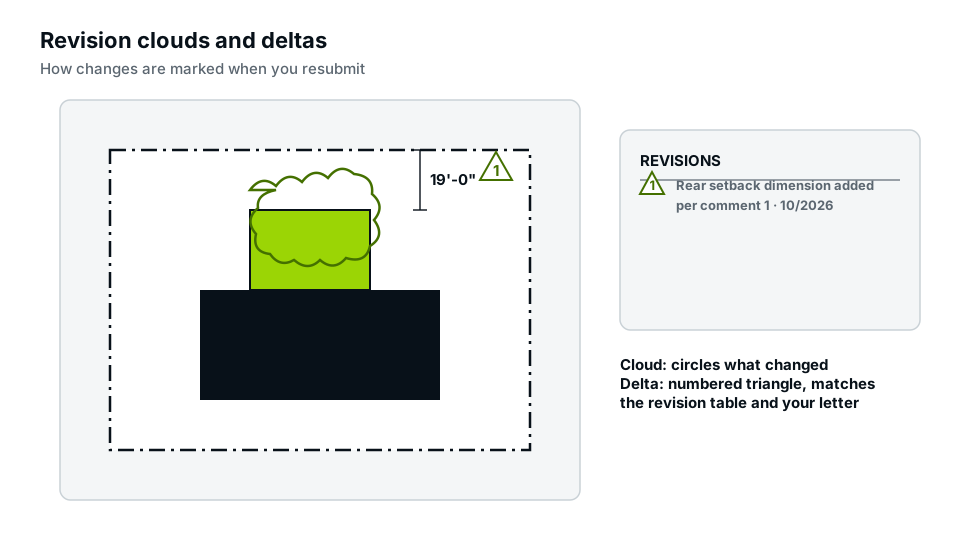
Our guide to revision clouds and deltas shows the conventions in detail.
Step 6: Write the response letter
The response letter repeats each comment, states what you changed and says where to find it. A good response is specific: “Rear setback of 18′-4″ added on Sheet A0.1, see cloud delta 1.” A weak response is vague: “Revised.” The specific version lets the reviewer verify in seconds. Our guide on writing a permit response letter includes a template.
Good vs weak responses
| Comment | Weak response | Good response |
|---|---|---|
| Show setbacks to all property lines | Done | Setbacks to front (25′-0″), sides (7′-2″, 9′-6″) and rear (18′-4″) added, Sheet A0.1, delta 1 |
| Specify footing size | See plans | Footings 16″ dia. × 36″ deep, below 32″ frost depth, added to Detail 3/S1, delta 1 |
| Guard required | Will comply | 36″ guard with 4″ max openings added, Section 2/A2.1, delta 1 |
Step 7: Check before resubmitting
- Every comment has a response.
- Every response points to a sheet and a delta.
- Every changed sheet is clouded and its revision block updated.
- No other sheet now contradicts the change.
- Files are named and formatted as the portal requires.
Step 8: Resubmit the full package
Most offices want the complete revised set, not only changed sheets, plus the response letter. Upload everything through the same permit record rather than starting a new application. Then watch the portal for status updates.
Common mistakes when responding
- Answering some comments and ignoring others.
- Fixing one sheet but leaving a conflicting dimension on another.
- Making unrelated design changes without clouding them, which can trigger fresh review.
- Arguing in the letter rather than citing the code section politely.
- Missing the response deadline.
Handling comments from several reviewers
On larger projects, zoning, building, structural, fire and public works reviewers may each send comments, sometimes on different dates. Wait until you have all of them, if the office allows, so you can make one coordinated resubmittal. Look for conflicts: a fire reviewer asking for a wider access path can clash with a zoning comment on lot coverage. Resolve conflicts with the reviewers before redrawing, and group your response letter by reviewer so each can find their own items quickly.
When to get help
If comments involve structure, engineering or zoning conflicts you are unsure about, or you have already been through two rounds, a drafter or engineer can save time. Our permit corrections service revises drawings, clouds the changes and prepares the response letter, and our engineer-stamped plans cover structural comments.
Frequently asked questions
How long do I have to respond to permit correction comments?
It depends on the office. Many allow several months before the application expires; check your notice.
Do I resubmit only the changed sheets?
Usually the full revised set, but follow the office’s instructions.
Can I disagree with a reviewer’s comment?
Yes, politely, citing the code section. Ask for confirmation rather than ignoring the comment.
Will responding create new comments?
It can, if changes affect other parts of the design. Clouding every change and checking consistency reduces this.
Is a response letter required?
Many offices require one; where they don’t, it still speeds up review.
What if new comments appear in the second round?
Treat them the same way: sort, revise, cloud with a new delta number and answer each one. New comments often come from changes made in the first round, so check knock-on effects carefully.