
Revision clouds are the scalloped outlines drawn around changes on a revised drawing. Paired with a small triangle called a delta, they tell a plan reviewer exactly what changed since the last submission. On a resubmittal, they save the reviewer from comparing two sets line by line, and they make your response letter verifiable. Most permit offices expect them, and some reject resubmittals without them.
Quick answer: Draw a revision cloud around every change on a revised sheet and place a delta (triangle) with the revision number next to it. Record the same number, date and description in the sheet’s revision block. Use a new number for each resubmittal, and reference the delta in your permit response letter so the reviewer can find each change.
What revision clouds and deltas are
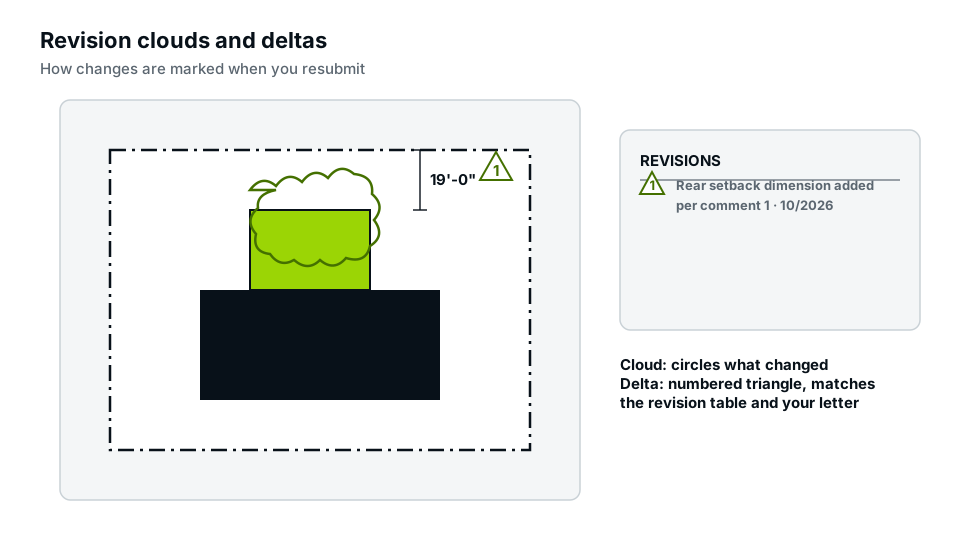
- Revision cloud: a freehand-looking scalloped outline around the changed area, whether a dimension, note, detail or part of the plan.
- Delta: a triangle containing the revision number, placed on or next to the cloud. Some firms use other shapes or letters, but the triangle is the common convention.
- Revision block: a table in the title block listing each revision’s number, date and description.
Why reviewers want revision clouds
A reviewer checking a resubmittal needs to confirm two things: every comment was addressed, and nothing else changed without review. Clouds answer both. Combined with a permit response letter that points to each delta, they let the reviewer verify a resubmittal quickly. That fits into the overall process in our pillar guide on why building permits get rejected.
Conventions for revision clouds on permit drawings
- Cloud every change, however small, including text and dimension edits.
- Keep the cloud tight around the change, but don’t cover the content.
- Place the delta on or touching the cloud, with the revision number.
- Use one revision number per submission, not per change.
- Update the revision block on every sheet that changed.
- Update the sheet index if your set has one, showing current revision numbers.
- Keep consistent line weight and delta size across the set.
The revision block
The revision block lives in the title block of each sheet. A typical entry:
| Rev | Date | Description |
|---|---|---|
| 1 | 03/14 | Plan review comments, setbacks and footing details |
| 2 | 04/02 | Second review, guard detail |
Sheets with no changes keep their previous revision status. The sheet index, if your set has one, should list the latest revision of each sheet. Our guide on drawing sheet numbering explains how the index and title blocks fit together.
Previous clouds: keep or remove?
Practices vary. A common approach is to show only the current revision’s clouds and remove earlier ones, while leaving earlier deltas and the revision block history intact. Some offices want all clouds kept so they can trace history. Follow the office’s instructions; if none are given, show current clouds only, as that keeps attention on what is new.
What counts as a change
Cloud anything that differs from the last submitted version: added or changed dimensions, notes, details, labels, moved elements, changed sizes, new sheets (cloud the title or add a note saying the sheet is new) and deleted items (cloud the area where they were, with a note). If a design change affects several sheets, cloud it on each sheet.
How revision clouds fit with the response letter
Every response in your letter should point to a sheet and a delta, and every cloud should correspond to a response or to a listed additional change. That two-way link is what reviewers check. Our guide on responding to permit correction comments shows the full workflow.
Common mistakes
- Unclouded changes: a change the reviewer finds without a cloud can trigger a fresh review and erode trust.
- Clouding the whole sheet: it defeats the purpose and makes the reviewer check everything.
- Missing deltas: clouds without numbers can’t be linked to the response letter.
- Revision block not updated, so the sheet still looks like the old version.
- Different revision numbers for the same submission across sheets.
- Handwritten clouds on scanned drawings when the office expects clean CAD revisions.
Drawing revision clouds in CAD and PDF tools
Most CAD programs have a revision cloud command that converts a rectangle or polyline into a cloud, and a delta block or tag. PDF editors also offer cloud markup tools, which work for small corrections on PDF-only sets, though many offices prefer revisions made in the source drawing so that text and lines stay crisp. Put clouds on their own layer so they can be turned off or cleared before the next revision.
Revision clouds on a simple site plan
Revision clouds aren’t only for large drawing sets. On a one-sheet site plan for a fence or shed, the conventions are the same: if the reviewer asked for setback dimensions and an easement, cloud each new dimension and the easement line, place delta 1 beside each cloud, and add “1 · date · setbacks and easement added per review” to the revision block. Even on a single sheet, this lets the reviewer approve the resubmittal in a minute rather than rechecking the whole plan.
After approval
Once the permit is issued, the approved set becomes the reference for construction and inspections. If you need to change the design during construction, a formal revision to the approved plans is usually required, and the same cloud and delta conventions apply. Our permit corrections service handles revisions at any stage.
Frequently asked questions
What is a delta on a drawing?
A triangle with a revision number placed next to a revision cloud, linking the change to an entry in the revision block.
Do I need revision clouds for a small change?
Yes. Even a single dimension change should be clouded so the reviewer can find it.
Should I remove old revision clouds?
Often yes, keeping only the current revision’s clouds, but follow your permit office’s instructions.
What if a whole sheet is new?
Add it to the sheet index with the current revision number and note that it is a new sheet, or cloud its title.
Can I draw revision clouds by hand?
Some offices accept it on small projects, but clean digital revisions are preferred and often required for online submittals.