
Knowing how to read a site plan lets you check a drawing before the permit office does, which is the cheapest moment to find a mistake. You do not need drafting training. A site plan follows a predictable layout, and if you read it in the right order you can confirm the important facts in about ten minutes.
Quick answer: Start with the title block, north arrow and scale. Then trace the property lines and check their lengths, find the existing buildings, find the proposed work, and confirm the distances from the new work to each lot line. Finish with the notes, legend and any easements or utilities.
Step 1: Read the title block
The title block is the box, usually along the right edge or bottom of the sheet, that identifies the drawing. Check that it shows the correct address and parcel number, the project description, the date and who prepared it. Many good site plans also list their sources, such as “county parcel map” or “survey dated 2009”. If the address is wrong, nothing else on the sheet matters.
Step 2: Find the north arrow and the scale
The north arrow tells you how the drawing is oriented. North is usually, but not always, at the top. The scale tells you how to measure: on a drawing at 1 inch = 20 feet, one inch on paper equals twenty feet on the ground. Look for a graphic scale bar, which stays accurate even if the PDF is printed at a different size. If either is missing, expect a correction. We explain scales further in site plan scale explained.
Step 3: Trace the property lines
Property lines are usually drawn as a heavy dashed line, often with a long-short-short pattern. Each side should carry a length in feet, and sometimes a bearing such as N 89°12′ E. Compare those lengths with your deed, plat or survey. Small rounding differences are normal; a side that is several feet off is not.
Also check the shape. If your lot has an angled corner or a curved front along a cul-de-sac, the drawing should show it.
Step 4: Identify existing buildings and surfaces
Existing buildings are usually drawn solid or outlined and labelled “existing”. Look for the house, garage, sheds, driveway, patios and walks. A site plan that leaves off an existing shed or patio can cause problems later, especially if your county limits lot coverage.
Step 5: Find the proposed work and its distances
This is the heart of the drawing. The new work should look different from everything else, usually shaded, hatched or drawn in a heavier line, and labelled “proposed” or “new”. Check three things:
- The size matches your design (for example, a 12 × 20 ft deck).
- There is a dimension from the new work to every nearby property line.
- Those distances are at least the setbacks your zoning requires.
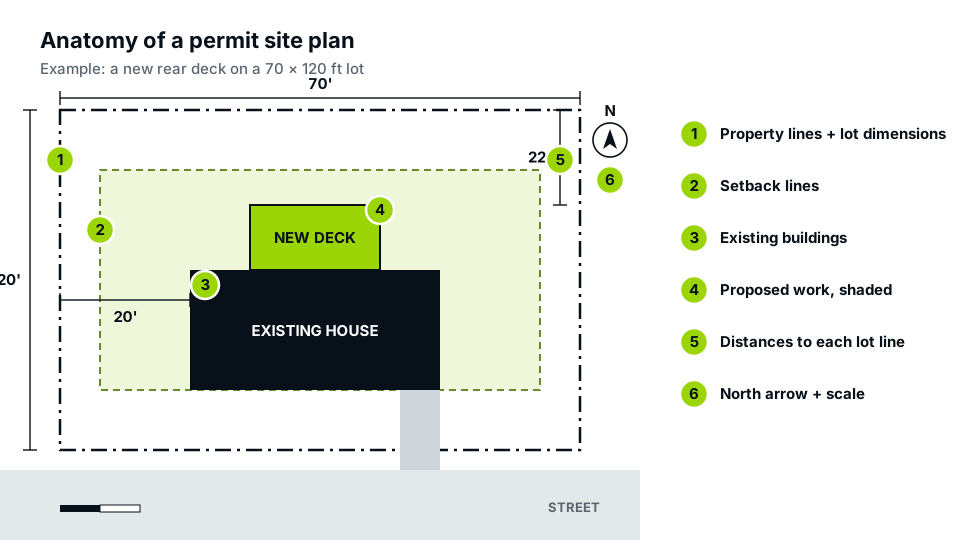
Setback distances are the numbers reviewers check first. Our guide to what a site plan is lists everything else a permit plan should show.
Step 6: Read the notes, legend and constraints
Finally, read the general notes and the legend. The legend explains line types and hatching. Notes often state the zoning district, the setbacks used, the lot area, lot coverage, and the flood zone. Then look for constraints: easements (often a thin dashed strip along a lot line), septic systems, wells, overhead lines and drainage arrows. If you know of an easement that is not shown, raise it now. Our guide on easements explains what to look for.
How to read a site plan’s symbols and line types
| You see | It usually means |
|---|---|
| Heavy long-short-short dashed line | Property line |
| Thin dashed line inside the lot | Setback line or easement edge |
| Solid filled shape | Existing building |
| Hatched or tinted shape | Proposed work |
| Line with arrows or ticks at each end and a number | Dimension |
| Circle with a dot or rough outline | Tree (canopy outline) |
| Arrow with a percentage | Direction and slope of drainage |
| Letters such as “W”, “S”, “E” on a line | Water, sewer, electric line |
Reading a plan someone else prepared
If a contractor, designer or drafting service prepared your site plan, read it as if you were the reviewer. You know the property better than anyone: where the old shed really sits, where the septic tank is, which corner floods after rain. Mark anything that does not match reality and ask for it to be corrected. A plan that matches the ground is far less likely to cause trouble at inspection, when the inspector compares what was built with what was approved.
Red flags to catch before you submit
- A distance from the new work to the property line that is less than your setback.
- Dimensions that do not add up (a 100 ft lot whose parts total 96 ft).
- New work drawn on top of an easement.
- A drawing that does not match what is actually on the lot today.
- No statement of sources, or a plan that implies it is a survey when it is not.
If you find any of these on a plan prepared for you, ask for a correction before submitting. Our site plans are drafted to the local checklist and list their sources in the title block for exactly this reason.
Frequently asked questions
How do I measure distances on a site plan?
Use the graphic scale bar: measure the distance on paper with a ruler, then compare it with the bar. If the plan is at 1 inch = 20 feet and the gap is 1.5 inches, the distance is 30 feet.
What does the dashed line around my lot mean?
A heavy dashed line, often with a long-short-short pattern, is the property line. A thinner dashed line inside it is usually a setback line or the edge of an easement.
Why does my site plan say it is not a survey?
Because it is drawn from records rather than measured in the field. That note is honest and normal; it tells the reviewer the plan shows the project, not the legal boundary.
What if the lot dimensions on the plan don’t match my deed?
Small rounding differences are normal. Larger differences should be checked against a survey or plat before you submit, and corrected on the plan.