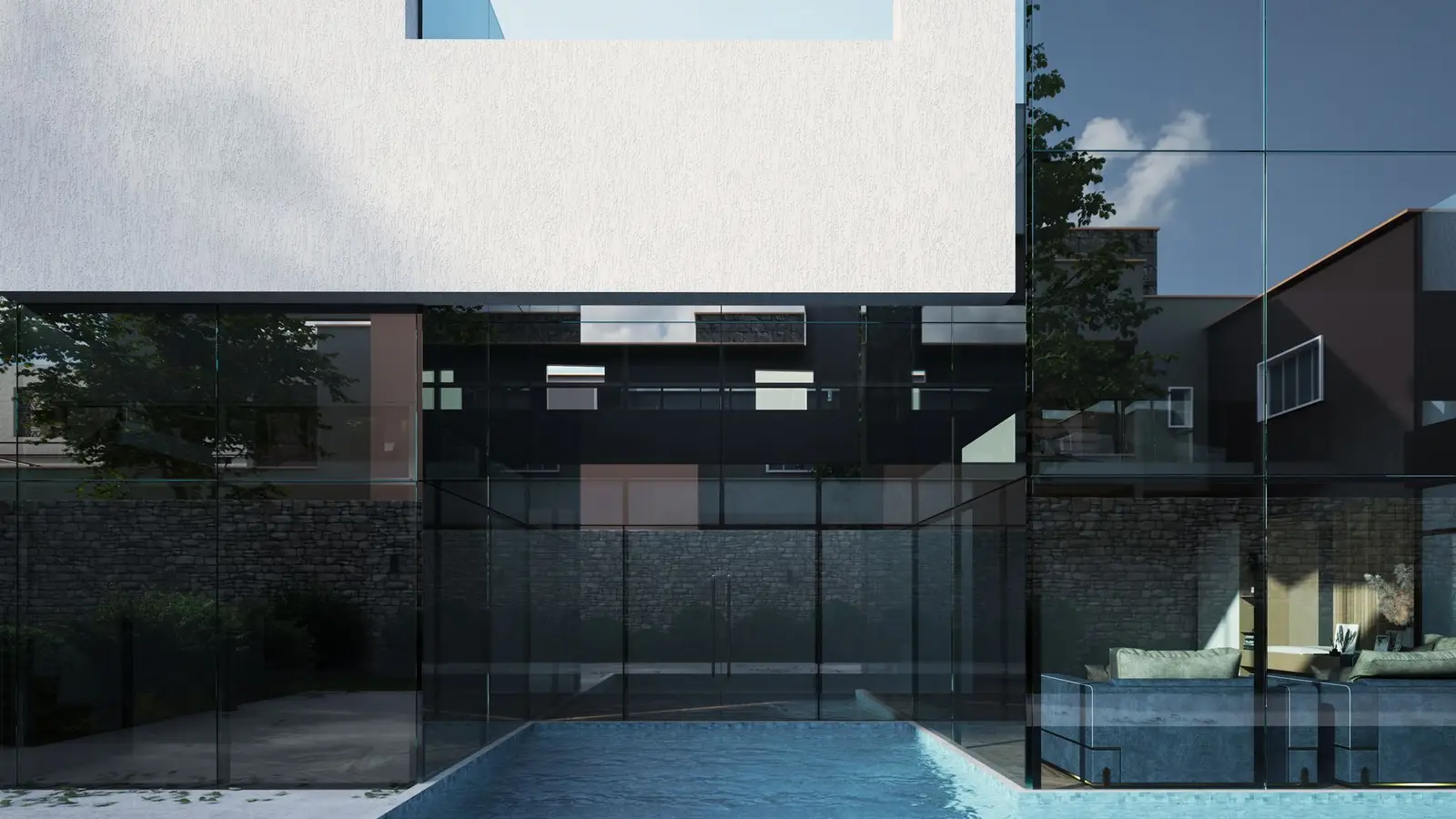

An architectural rendering is an image of a building or space created from a 3D model before it is built. Renderings show what a project will look like, with materials, light, landscaping and context, in a way that technical drawings can’t. Homeowners use them to make design decisions, HOAs and design boards use them to judge appearance, and builders and sellers use them to market a project. This guide explains the types, the uses, what you need to provide and how renderings relate to permit drawings.
Quick answer: An architectural rendering is a realistic or stylised image generated from a 3D model of a proposed building or room. Common types are exterior and interior still renderings, aerial views, 360° panoramas and animations. Renderings help with design choices, HOA and neighbour approvals and marketing, but they don’t replace scaled permit drawings.
Key takeaways
- A rendering is built from a 3D model, which is built from plans, elevations or measurements.
- Accuracy depends on the inputs: better drawings and photos give better renderings.
- Renderings are persuasive for HOAs, design boards and neighbours.
- Permit reviewers need scaled drawings; renderings are supporting material.
- Agree the views, materials and revision rounds before work starts.
What an architectural rendering is
A rendering starts with a 3D model of the building, built from floor plans, elevations, a site plan or measurements of an existing house. Materials, such as siding, roofing, stone, glass and paint, are applied to the model. Lighting is set to match a time of day, and the camera is placed where a person would stand. Software then calculates how light interacts with the materials to produce the final image. The result can range from a clean, simplified look to a near-photographic image with landscaping, sky and people.
Types of architectural rendering
| Type | What it shows | Typical use |
|---|---|---|
| Exterior still | The building from street or yard level | HOA approval, design decisions, marketing |
| Interior still | A room with finishes, furniture and light | Kitchen and bath choices, sales |
| Aerial or bird’s-eye | The building and site from above | Site layout, ADUs, larger projects |
| Before and after | Existing photo alongside the proposed result | Additions, remodels, neighbour discussions |
| 360° panorama | An interactive view around one point | Interiors, online listings |
| Animation or walkthrough | A moving camera path | Larger developments, marketing |
| Massing or clay model | Simple shapes without materials | Early design, height and bulk studies |
Our guides compare exterior and interior renderings and explain before-and-after renderings.
When an architectural rendering helps
- Design decisions: seeing materials, colours and roof forms before committing.
- HOA and architectural review: committees judge appearance; see renderings for HOA approval.
- Historic and design review boards: showing how a project fits its context.
- Neighbour conversations: explaining an addition or ADU before a hearing.
- Financing: some lenders like to see what is being built.
- Marketing: selling homes before they are built, or listing renovated properties.
- Contractor bids: helping bidders understand finishes and scope.
Renderings vs permit drawings
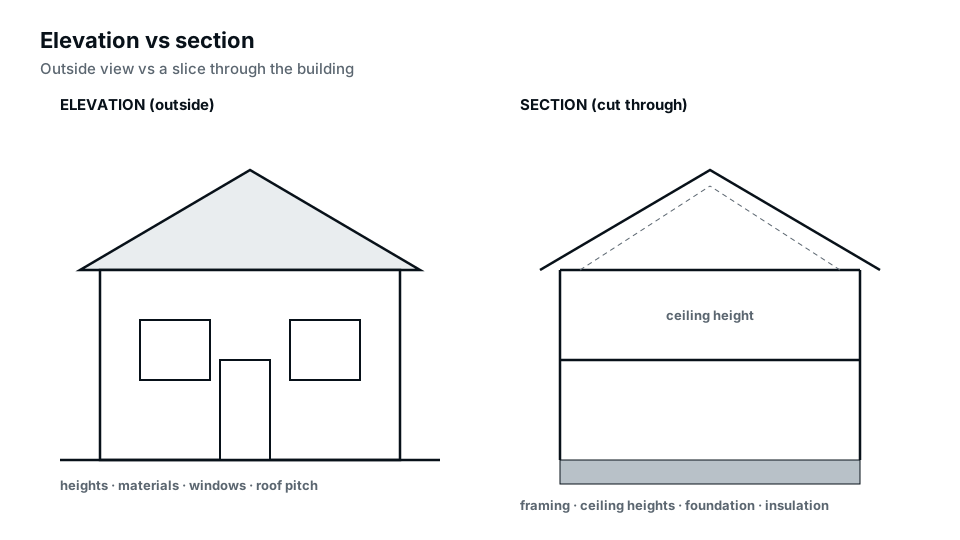
Permit reviewers check compliance using scaled, dimensioned drawings: site plans, floor plans, elevations and sections. Renderings use perspective, which distorts dimensions, so they can’t be measured. Some design review processes ask for a rendering in addition to drawings, but a rendering never replaces them. See our elevation drawings guide and the permit drawing set guide for what reviewers need.
What you need to provide
The quality of a rendering depends on the information behind it. Typical inputs:
- Floor plans and elevations, or a sketch with dimensions.
- A site plan or survey for exterior and aerial views.
- Photos of the existing house and surroundings for additions.
- Material and colour choices: product names, samples or reference photos.
- Preferred camera views.
- Reference images of the style you want.
Our guide on what to send for a rendering gives a full checklist.
The rendering process
- Brief: agree the views, style, materials and number of revision rounds.
- Modelling: build the 3D model from drawings and measurements.
- Draft views: share low-detail views to confirm camera angles and massing.
- Materials and lighting: apply finishes and set the scene.
- Draft render: share for comments.
- Revisions: adjust materials, colours, landscaping or angles.
- Final images: deliver at agreed resolution and formats.
How accurate is a rendering?
A rendering is as accurate as its model. Built from accurate drawings and measurements, it represents proportions, heights and openings faithfully. But materials and colours depend on screens and printers, and landscaping is often idealised. For approvals, ask for a neutral, honest presentation, with realistic planting and no exaggerated lighting, so reviewers and neighbours see what will actually be built.
Choosing camera views
For HOA and neighbour purposes, eye-level views from the street or a neighbour’s yard are most useful, because they show what people will actually see. Aerial views explain site layout. Interior views are best from a corner, showing two or three walls. Choose views that answer the decision you need to make.
Styles of rendering
- Photorealistic: close to a photograph; best for marketing and final approvals.
- Clean or architectural: realistic materials but simplified context; good for review boards.
- Sketch or watercolour: artistic style for early design or presentations.
- Massing: plain shapes to show bulk and height.
Revisions and changes
Changing materials, colours or lighting on an existing model is usually quick. Changing the design itself, such as moving walls or changing the roof, means remodelling and takes longer. Agree how many revision rounds are included, and finalise the design before detailed rendering starts.
Reviewing a draft rendering
When the first draft arrives, check it against the drawings before judging the look. Are windows in the right places and the right sizes? Is the roof pitch right? Do the proportions match the elevations? Then review materials and colours, and finally mood and landscaping. Collect all comments into one list, with marked-up screenshots where helpful, rather than sending them piecemeal. A single, complete set of comments per round keeps revisions efficient.
File formats and resolution
Still renderings are usually delivered as high-resolution JPG or PNG images, sized for screens, print or large boards. Ask for the sizes you need: presentation boards for hearings need higher resolution than images for an email to the HOA. Panoramas and animations come as interactive files or video.
Renderings for additions and remodels
For additions, the most persuasive image is often a before-and-after pair from the same camera position: a photo of the house today and a rendering of the house with the addition. This lets reviewers and neighbours judge the change directly. See before-and-after renderings and our home addition permit guide.
Renderings for ADUs and new homes
An aerial rendering showing the main house, the ADU, the yard and the access path explains a backyard unit better than any drawing, especially for neighbours concerned about privacy. For new homes, exterior views from the street help with HOA approval and marketing. See our ADU permit guide.
Renderings during design development
Renderings aren’t only for the end of the design process. Early massing views, simple shapes without materials, help test whether an addition’s roofline works or whether a second storey looks too tall from the street. Mid-design views help choose between two or three material schemes. Final, detailed renderings come once the design is fixed. Using renderings in stages costs less than producing photorealistic images of a design that will still change, and it catches problems while they are cheap to fix.
What affects rendering effort
Several factors drive how much work a rendering takes. The number of views is the most obvious, but complexity matters as much: a simple box with a gable roof is quick to model, while a house with dormers, porches and detailed trim takes longer. Photorealistic landscaping, interiors full of furniture and fixtures, dusk lighting, and animation all add effort. Starting from accurate CAD drawings saves modelling time compared with working from sketches. Design changes after modelling has started are the biggest cause of extra work, so settle the design first.
Lighting, season and atmosphere
The same model can look very different depending on the light. Midday light shows materials clearly and is best for approvals. Late-afternoon light adds warmth and depth. Dusk with interior lights on is popular for marketing because it makes homes look inviting. Seasons matter too: summer foliage can hide a building that will be visible in winter. For approval renderings, choose a neutral setting that represents the building fairly; for marketing, the more atmospheric options are appropriate.
Renderings for multi-family and commercial projects
Larger projects, such as townhouses, small apartment buildings and commercial buildings, often face public hearings and design review where renderings are expected. These typically include street-level views showing the building between its neighbours, aerial views of the whole site, and sometimes views from specific locations that a planning department requests. Accuracy and context are especially important here, because the images become part of the public record. See our commercial site plans for the drawings that go with them.
Renderings for builders and developers
Builders use renderings to sell homes before construction, to help clients choose finishes, and to show investors what a project will look like. Consistent rendering styles across a development make marketing materials look coherent. Our contractor services include renderings alongside permit drawings.
Who makes architectural renderings
Renderings are produced by architects and designers as part of their services, by specialist visualisation studios, and by drafting firms that also prepare permit drawings. Working with someone who also draws your plans has an advantage: the model comes from the same drawings the permit is based on, so the images match what will be approved. Specialist studios often focus on high-end marketing imagery. Whoever you choose, look at examples of similar projects, ask what inputs they need, and confirm how many revisions are included.
Renderings and virtual staging
Virtual staging, which adds furniture to photos of empty rooms, is related but different. It decorates existing spaces for listings, while renderings show spaces that don’t exist yet or will change. Both are useful for sellers. If a listing uses renderings of planned improvements, label them clearly as proposed designs so buyers aren’t misled.
Common mistakes
- Rendering before the design is final, leading to costly remodelling.
- Using a perspective rendering where a scaled drawing is required.
- Over-idealised landscaping that won’t exist for years.
- Materials that don’t match the actual products chosen.
- Camera angles that hide the parts reviewers care about.
Getting a rendering
Our 3D renderings service builds models from your plans, elevations, sketches or photos and produces exterior, interior and aerial views. If you don’t have drawings yet, we can prepare floor plans and elevations first, which also serve your permit.
Frequently asked questions
What is an architectural rendering?
An image of a proposed building or room created from a 3D model, showing materials, light and context.
Can a rendering be used for a building permit?
Only as supporting material. Permits require scaled, dimensioned drawings such as site plans, floor plans and elevations.
Can renderings be used in real estate listings?
Yes, labelled clearly as proposed designs.
What do I need to provide for a rendering?
Plans and elevations or dimensioned sketches, photos, and material choices.
How realistic are renderings?
They can be near-photographic, but accuracy depends on the inputs and materials.
Do HOAs accept renderings?
Many welcome them alongside site plans and elevations, especially for visible changes.
What is the difference between a rendering and an elevation?
An elevation is a flat, measured drawing; a rendering is a perspective image for visualisation.
Can I get a rendering of my existing house with new colours?
Yes. A model of the existing house, or a before-and-after composite from a photo, can show new colours and materials.
How many rendering views do I need?
For most homeowner projects, two to four views: a street view, a rear or side view, and an interior if finishes are being chosen.